Reference-Based Face Change
Change Face in Video.
Keep the Shot.
Recast the Talent.
Upload one consented face reference and Moosky re-renders the scene with that identity locked — the same blocking, wardrobe, and camera move, on a new face. Built for scene re-shoots, previz, and creators recasting their own content. Billed per render in credits.
Model Options
The engines behind the recast
Pick per scene: the identity-locked workhorse, the long-take hero engine, or a cheap draft to test the new face first.
Wan 3.0 for reference-locked identities
Attach one clear face photo and Wan 3.0 carries that identity through the scene — face, build, and wardrobe hold from first frame to last. First and last-frame control keeps the re-shot landing exactly where the original did.
Seedance 2.5 for long re-shot scenes
When the recast has to run long, Seedance 2.5 holds the new face through a single continuous take up to 30 seconds, with synchronized dialogue and ambience — so a re-shot confrontation doesn't arrive as four mismatched clips.
LTX 2.5 for face-fit drafts
Test the new face before you commit the hero pass: draft the scene on LTX 2.5 at a fraction of the premium cost, compare the reads, then re-render only the keeper on Wan 3.0 or Seedance 2.5. Failed drafts refund automatically.
Example Outputs
Same scene, recast identity, kept through the take
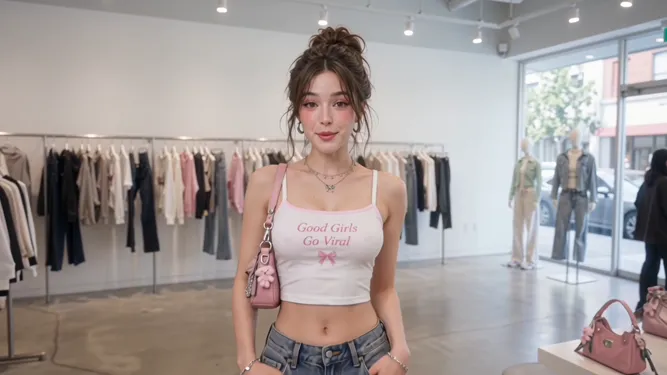
Reference-driven renders from Moosky's cinematic engines — the same blocking and grade on a new face.


Why use it on Moosky AI
Recast without a call sheet
Everything a re-shoot needs lives on one credit balance — reference locks, retakes, cheap drafts, and a watermark-free export.
Identity-locked renders
One consented reference locks the face across takes; a render that drifts off-model comes back as a retake, not a continuity error.
No crew recall
The scene re-renders from references and direction — no location re-permit, no talent day, no booking the original studio back.
Side-by-side casting
Run the same scene against several face references and compare the reads before committing to the hero pass on the flagship engine.
A voice to match
Pair the new face with a cloned narration voice on CosyVoice so the recast sounds as consistent as it looks across cuts.
Credits per take
Each render is quoted in credits before it runs; failed generations refund, and you pay for the takes you keep, not the month.
Stay in the consent lane
Built for your own face or one you have explicit permission to use — brand talent, your creator persona, previz casting.
How It Works
Three steps to the recast
Upload the reference
One clear face photo — yours, or a model's with documented sign-off. Even light, no sunglasses, nothing covering the features.
Re-run the scene
Point the engine at the original shot — the same storyboard, blocking, and camera — and prompt the new take around the locked face.
Retake and export
Keep the read you want, hero-pass the keeper, and download watermark-free for the client, the channel, or the festival cut.
The re-shoot that never needed a crew day
When the model Marcus shot for a thirty-second outerwear spot pulled out a week before delivery, he didn't call the crew back. He re-ran the scene from the same storyboard reference with a replacement model's consented photo: the same jacket, camera move, and timing came back on a new face. The re-shoot that would have cost a crew day cost forty-one credits and an afternoon.
That's what a face reference changes on this side of production. Pre-viz a pitch with the client's spokesperson before a single camera rolls, swap an actor out of last season's episode, or re-shoot the pickup your creator can't film again. Upload one clear photo of yourself — or of someone who said yes — and the reference kit holds that identity through the take.
Credit-based
Simple, honest pricing
Every render is quoted in credits before it runs, at 100 credits per dollar. Draft passes on LTX 2.5 cost a fraction of the cinematic engines, failed generations refund automatically, and unused credits never expire.

More from Moosky AI
Explore our complete suite of AI tools.
Frequently Asked Questions
How do I change a face in a video without re-shooting it?
You give the model two things: the consented face reference and the original shot's direction — its storyboard, blocking, wardrobe notes, and camera move. A reference-to-video engine then re-renders the scene conditioned on that photo, so the identity changes while everything you approved around it stays intact. It is a recast, not an edit: the physics, lighting, and motion come from the model, not a masking tool.
Can I put my own face into a video I never filmed?
Yes — for your own content that's the everyday case: creators recast themselves into previz shots, brand spots, and pickups they can't re-stage. Upload a clear front-facing photo of yourself under even light, describe the scene, and the engine performs it with your identity locked. One photo of you, a few credits per take, no studio booking.
What's the consent rule on using someone else's face?
Use your own face, or one you hold explicit permission to use — contracted talent, a client who signed off, a collaborator who said yes. Deceptive or non-consensual use is against Moosky's terms and most model providers', and it's also the fastest way to lose a brand deal. When a recast is for a pitch or previz, label it as such; the frame is generated, and the deliverable should say so.
What makes the new face come out looking right?
The reference photo does most of the work: one clear, front-facing shot in even light, no sunglasses, hair off the key features, and a face filling a good share of the frame. A second photo at a slight angle helps the engine hold the profile in turns. If a take drifts off-model, you retake it — the reference stays locked and only the render reruns.
How much does a face-changed video cost?
Billing is per render, quoted on screen before anything runs, at 100 credits per dollar. A draft pass on LTX 2.5 costs a fraction of the cinematic engines, so casting comparisons stay cheap until you pick a keeper for the hero pass. Failed generations refund automatically, and unused credits never expire between projects.
Do I need editing software or a separate voice tool?
No. Both cinematic engines render dialogue and ambience in the same pass, so the recast arrives with synced sound rather than a silent clip you then have to fix. If the scene needs narration, clone one voice on CosyVoice and reuse it across takes from the same credit balance — the re-shot cut, its audio, and export all happen inside Moosky.
Can I change the face again — or keep several castings on file?
Yes. The scene prompt and references live in your project, so swapping in a different photo re-runs the same direction on a new identity — useful when a client wants to see two faces or a role recasts mid-campaign. Each casting costs only draft-pass credits until you hero-pass the keeper, and every run stays in your history to compare or re-export.
Can I publish or monetize a recast I made here?
Work you generate is cleared for commercial distribution under Moosky and the selected provider's terms, exports carry no watermark, and you keep the IP on the finished scene. Keep your records — the consent basis for the reference and the run you published from — the same way you'd keep a model release for any shoot.
Disclosure
Moosky AI is an independent platform provider and reseller of AI model access. Product names, model names, and company names shown on this page belong to their respective owners. Moosky AI is not officially affiliated with, sponsored by, or endorsed by those providers unless expressly stated. Page content, examples, and previews may include AI-assisted and synthetic content.