Moosky AI field guide
How to Make Stop Motion Animation with AI: A 2026 Frame-by-Frame Workflow
Make stop motion animation with AI in 2026: the stepped-cadence prompt grammar, per-model picks, a classic-tools comparison, and a worked clay short priced in credits.
On this page
Stop motion with AI, straight answer: you are not rendering a physical set, you are directing a generative one. The look you are chasing is a grammar, not a material: motion that steps pose to pose instead of gliding, clay-matte skin with visible thumbprint dimples, felt and paper-cutout textures, miniature-set lighting, and a camera that sits on a locked tripod instead of drifting. On Moosky the pipeline is the same one behind the AI stop motion animation studio page: brief the tiny world in plain sentences, lock your hero as one reference, draft every idea cheap on LTX 2.5, carry the keepers to Wan 3.0 for weight, lay an announcer read on the spine, and export one finished clip at the length and aspect you named at brief. This is the doing side: the frame-rate techniques, the per-model picks, and the credit bill.
This guide assumes you have a character and a story beat, not a craft store. If you are evaluating whether the platform itself earns its credit bill before opening the composer, the pay-per-clip vs subscription math and what a usable clip actually costs cover the economics; this article is the workflow.
Quick answers
How do you make stop motion animation with AI? Describe the character, the set, and the beat in a plain-language brief, lock the hero as one visual reference, and render through a director-led studio that applies the stop-motion treatment: stepped pose-to-pose cadence, clay or felt texture, miniature-set lighting. No armature, no sticky tack, no frame-by-frame shooting.
What frame rate does AI stop motion use? Classic stop motion is usually photographed at 12 to 24 frames per second of capture, played back at 24 fps, which is what creates the signature tick. In a generative studio you do not set that number yourself: the stepped cadence is part of the treatment the model renders, and your job is the technique side (static camera, deliberate nudges, short beats) described below.
Which model should I use? Draft cheap on LTX 2.5, render hero beats with real weight on Wan 3.0, and reach for Seedance 2.5 only for a long continuous take or a 4K master. The engine table below is the short version.
Do I need any animation skill? No keyframes, no exposure sheet, no onion-skinning. You brief like an email and read the takes like an editor, which is the whole skill set.
What does it cost on Moosky? Credits at a fixed 100 credits = $1, quoted per run before anything dispatches, failed runs refunded. A finished stop-motion-style short typically lands in the tens of dollars including its hero pass; the worked bill below prices one end to end.
Can I use my own toy or pet as the hero? Yes. Attach a photo and it becomes the locked reference; every scene keeps that subject consistent, recast with clay-matte texture inside the tiny world you describe.
What stop motion looks like as a prompt style
Stop motion reads handmade because of four things, and each one is something you can direct in words:
- The tick. Motion lands pose to pose. A character does not flow from standing to waving; it arrives at three or four discrete poses and the gaps between them are visible. That stutter is the charm, not an artifact to fix.
- The matte. Clay skin takes light differently than digital skin: dull highlights, fingerprint dimples at the edges, seams where a limb meets a torso. Felt reads fuzzy at the border, paper cutouts cast hard flat shadows.
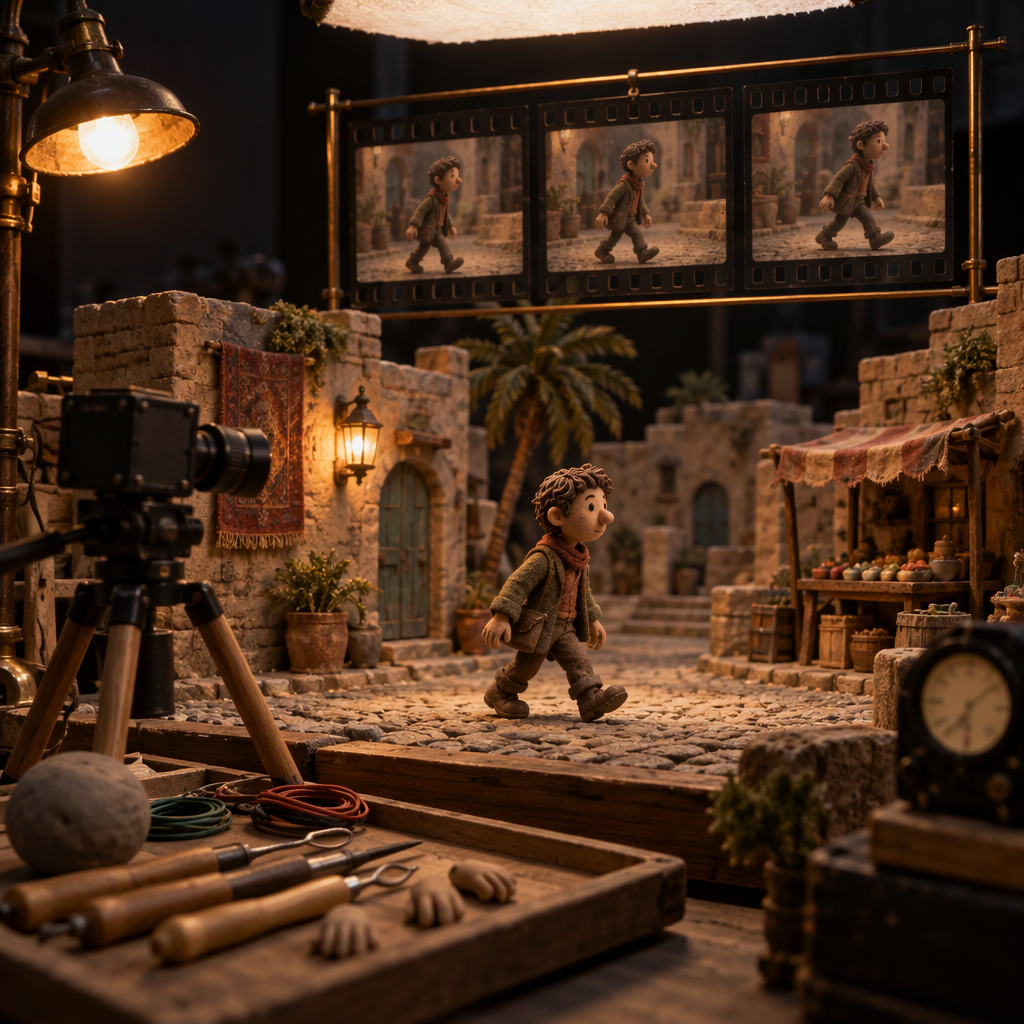
- The set. Everything is palm-sized, and the camera says so: shallow depth of field over a cobblestone street you could step on, a market stall with a striped awning, practical lantern light instead of a sky.
- The locked camera. Classic rigs sit still on a tripod and let the puppet move. Handheld drift and swooping drone moves instantly break the illusion, which is why "static camera" is the most valuable three words in any stop-motion brief.
On Moosky you do not hand-write that whole paragraph on every run. You brief the character and the world, the cinematic Director plans the scenes and holds your subject as one locked reference across them, and the stepped cadence and tactile grammar come with the treatment. The full capability claims live on the studio page itself; what matters for your prompts is knowing which knobs still need your hand: the camera sentence, the reference lock, and the beat lengths below.
Frame-rate and clay-frame techniques, per model
Stop-motion-style runs fail in three ways, and each has a technique rather than a re-roll:
- The take glides instead of ticks. Ask for the cadence explicitly in the beat description ("the courier moves in stepped poses, a stop-motion cadence, not a smooth glide"), keep the action small per clip, and cut beats short. A 3 to 5 second beat with one nudge reads stepped; a 10-second beat full of business reads as ordinary video.
- The hero drifts between scenes. Lock the reference before you render any motion: generate and approve one hero still of the character, then keep it as the single face file for every scene. The deep dive is the character-consistent AI video guide, and the mode itself is in What is Reference-to-Video (R2V).
- The camera wanders. Name the move as "static tripod camera" or at most a slow Push In. Motion grammar that belongs to live action, pans, tracking shots, whip moves, is where the miniature illusion dies first.
Then pick the engine per beat instead of one model for everything. The split below is the same economics the game-trailer and Wan guides ship with, applied to a clay set:
| Beat type | Engine | Why it's the pick | Honest ceiling |
|---|---|---|---|
| Cheap framing tests, loop ideas, vertical drafts | LTX 2.5 | Renders cheap and fast, so you can try three versions of the walk before approving one | Single-shot length caps at ~20s and only at 1080P or below; not built for big athletic action |
| The hero beats: the landing, the grab, anything with weight | Wan 3.0 | Physics-grade motion, so the puppet settles into the set with real heft instead of floating | Exact lip-sync is unreliable; on-screen text is approximate (bake title cards separately) |
| One continuous 16–30s walk-and-talk through the set, or a 4K delivery master | Seedance 2.5 / 2.0 | The length-and-reference engine and the resolution engine, flagship instruction following for the money shot | Premium, high-cost pick; on a tight budget Wan 3.0 carries most beats |
| The announcer read and the closing card VO | CosyVoice (via narration) | Pick or clone a narrator voice, scenes conform to the spoken line, the music bed ducks under it | VO is scripted per project; budget re-takes like any other beat |
The prompt grammar that makes a single stepped clip land, camera verbs, motion slots, the "no background music" sentence, is model-specific; the recipes are already written in the LTX 2.3 prompt playbook and the Wan 3.0 workflow guide. What changes for stop motion is the content of those slots: short beats, tiny nudges, a still camera, and one locked hero.
AI stop motion vs classic stop-motion tools
The honest comparison, because the two are not interchangeable:
| Dimension | Classic stop motion (puppet + armature + capture software like Dragonframe, or phone stop-motion apps) | AI studio stop motion (Moosky) |
|---|---|---|
| What you build first | A physical set, a puppet, an armature, sticky feet | A text brief plus one locked reference still |
| How frames arrive | You shoot them: nudge, capture, nudge, capture, hundreds per minute of screen | The treatment renders the stepped cadence; you approve whole takes |
| Cost driver | Weeks of build time plus capture time; hardware and materials on top | Quoted credit runs, drafts first, hero pass once |
| Re-take economics | Re-shoot the whole nudge sequence for that segment | Re-render the beat; delta-edit when only one thing is wrong |
| Texture truth | Real clay, real thumbprints, real light. Nothing touches it | Rendered approximation, very good, not physical |
| Scale | One animator, one scene at a time | Alternate heroes, sets, and aspects on the same balance |
| Best for | Festival shorts, brand spots where "real" is the selling point, hobbyists who love the craft | Story-first clips on a schedule: kid content, invites, mascots, explainers, classroom shorts |
The last row matters. If the deliverable's entire value is that hands really moved that puppet, buy the armature. If the value is the character, the joke, and the story beat, and it needs to ship this week, the studio route wins on time and re-take cost. Both the stepped cadence and the handmade look are part of the AI treatment, so the clip reads handcrafted to an audience scrolling a feed even though no one touched clay.
A worked example: a 30-second clay short, start to finish
The brief: a clay courier boy delivers a letter through a miniature village street, three beats, an announcer line, an end card. Here is the run, priced as it goes.
Step 1, the hero still. One render that defines the courier: matte clay skin with thumbprint dimples, felt coat, three-quarter angle, on the cobble set with the market stall behind him. This is the file you lock, so spend a pass or two getting it right; it is what keeps beat one and beat nine the same character. (This article's own hero image came out of exactly this pass on the platform.)
Step 2, brief the Director with the beat sheet. Open Project Director and paste the plan: "30-second stop-motion-style short, three beats: the courier walks the street with the satchel (static tripod camera), a door opens and a neighbor turns to look (small nudge poses), the letter lands, title card holds. Announcer line over the last beat, no on-screen text before the card." The director scripts the beats, drafts them, and prices the whole run before anything renders.
Step 3, draft every beat cheap. Six LTX 2.5 passes at 720P, four to eight seconds each, cover all three beats plus alternates. At the live list prices, 4-second drafts run about 66 credits and 8-second drafts about 121 credits, call it roughly 550 credits for the draft round. Read each take like an editor: did it tick or glide? Did the courier stay on model? Is the camera sitting still?
Step 4, render the keepers on the hero engine. The walk and the door beat both earn a Wan 3.0 re-render: two 10-second 1080P hero passes at 308 credits each, about 616 credits. The neighbor's turn was already honest at draft tier; spend nothing more on it. The composer shows the exact quote on the run button before anything dispatches, and a failed run refunds itself automatically.
Step 5, one high-resolution master. The cut lands on the site, so one continuous 1440P hero insert of the letter landing goes on LTX at 10 seconds: about 303 credits. If the whole short needed a 4K master instead, the engine table sends that tier to Seedance; LTX carries a matching 4K option, and the same 10-second run there is about 472 credits.
The bill. Drafts 550, hero passes 616, master 303: about 1,470 credits, roughly $15 on a balance priced at 100 credits = $1, no subscription, no expiry, and that number includes the drafts that did not survive. The same three beats produced by hand would be a weekend of building, a day of capture, and no undo button. A voice-over costs no separate line item: narration is priced per finished video inside the Project Director run, and the script and voice passes are cheap, the picture is where the budget goes.
Then re-use the spine. The courier boy is now a series: next week the letter gets opened. The reference lock and the beat sheet stay; you re-render only what moved.
Frequently asked questions
Is AI stop motion real stop motion? It is the visual language of stop motion, rendered: the stepped cadence, the matte textures, the miniature set. It is not a photographed puppet, and the comparison table above is where that line sits. For story-first clips on a schedule the distinction stops mattering to audiences; for craft-first work it matters entirely.
Do I have to set a frame rate like 12 fps or "ones on twos"? No. In a physical shoot that number is the animation rhythm; in a generative studio the stepped pose-to-pose cadence is part of the treatment, and your controls are the beat length, the smallness of the nudge, and a static camera. Keep actions to one beat per short clip and the tick holds.
Why does my clay character look different in the second scene? Because no reference was locked. Generate and approve one hero still first, keep it as the only face file across scenes, and give every other reference an explicit job (wardrobe, set, prop). The character-consistency guide walks the full failure list.
Can I turn my kid's birthday or a classroom project into a clay short? That is one of the commonest runs: invitations, alphabet clips, classroom explainers, bedtime shorts. The stepped craft look holds young attention, the brief is text-first so a teacher or parent writes it like an email, and the export is watermark-free at the aspect you name, 16:9 for the TV or 9:16 for the phone.
Which model gives the most authentic clay look? Start every idea on LTX 2.5 because it is cheap to iterate, and take the approved take to Wan 3.0 where the motion needs weight. Seedance 2.5 earns its premium only for the long continuous take or the 4K master. Authenticity in stop motion comes from cadence, texture, and a still camera more than from any single engine.
What happens to my credits when a take comes out wrong? Failed runs refund themselves automatically; approved-but-weak takes just cost the quoted run, which is why the workflow drafts cheap first. You pay hero-tier prices once, on the shot you kept. Top-ups and the credit math are on the credits page, and starting a project is here.
The studio page is the home for this look: AI stop motion animation on Moosky, and every engine above runs under one balance at 100 credits to the dollar.
Create with Moosky AI
Turn ideas into finished productions
Access leading AI models and production workflows from one workspace.
Try Moosky AIComments
Comments are reviewed before they appear publicly.
Join the discussion —sign inorcreate an accountto leave a comment.
No approved comments yet. Start the conversation.