Moosky AI field guide
What is Reference-to-Video (R2V)? How It Works and What You Can Make With It
What reference-to-video (R2V) is, how reference conditioning works, how it differs from text-to-video and image-to-video, and what it costs on Moosky.
On this page
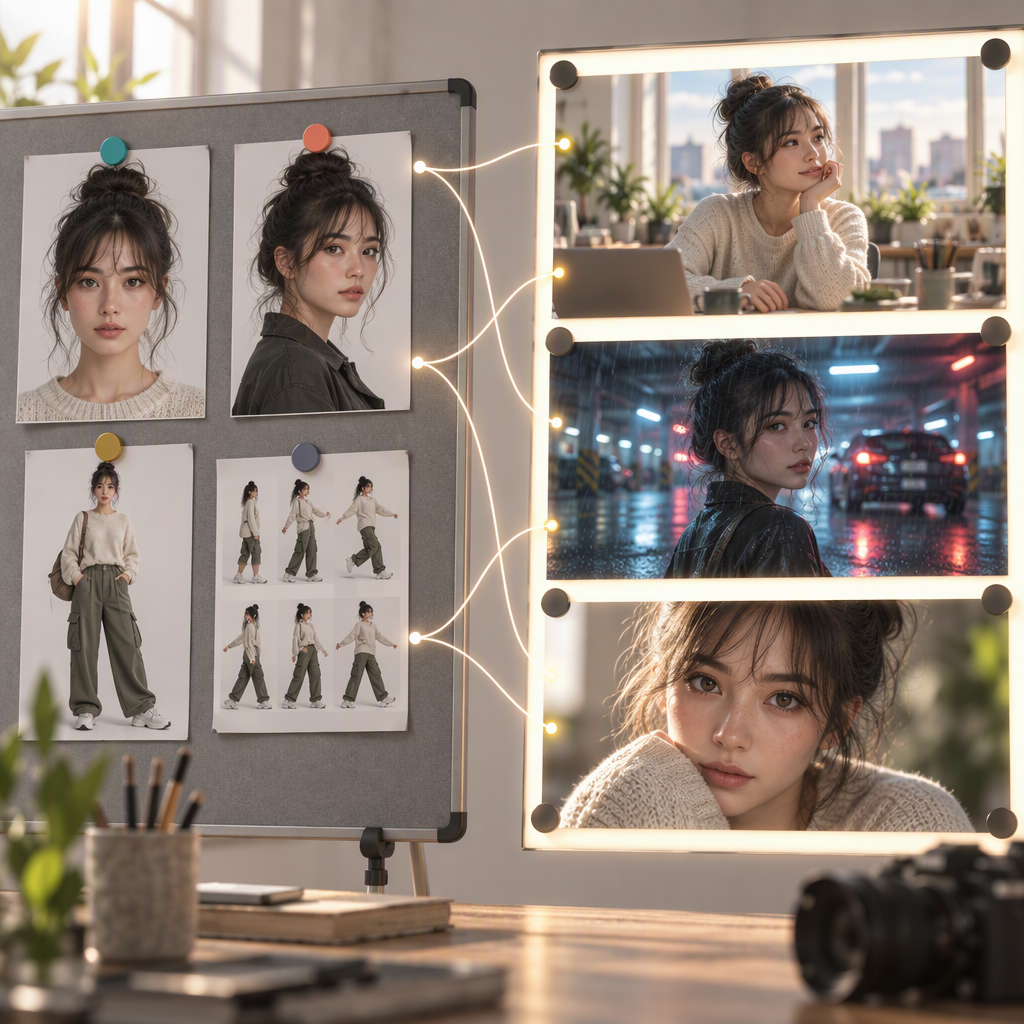
Reference-to-video (R2V) is an AI video generation mode where you give the model reference material — images, clips, or audio — alongside your prompt, and it conditions the output on what those references show. Your prompt still controls the scene: setting, action, camera move, mood. The references control who and what appears in it. The payoff is the thing text prompts are bad at: the same face, product, or voice in every clip, so scene five matches scene one.
If you have ever generated a character once and gotten a different person the next take, R2V is the mode built for that problem. This article covers the concept: how reference conditioning works, how R2V differs from text-to-video and image-to-video, why the naming varies, and what a reference clip costs on Moosky's live engines. The step-by-step execution lives in the MiniMax H3 Ref2V workflow guide and the Wan 3.0 reference-steering guide.
How reference conditioning works
Every video model is answering one question per frame: "what should this look like?" A text prompt answers it in words, which is lossy by nature — "a woman in her thirties with curly hair" fits millions of faces, and the model picks a new one each generation.
References answer in pictures instead. The model extracts identity features from your files — facial structure, hair, the shape of a bottle, the cut of a jacket, the timbre of a voice — and pins those features while it renders the new scene your prompt describes. On Moosky's R2V composers you attach multiple files and give each one a job through upload order and prompt labels:
Image 1— the face or characterImage 2— wardrobe, styling, or productVideo 1— a motion or camera-move referenceAudio 1— a voice for dialogue scenes
That reference-sheet pattern is why R2V scales past one clip: you curate the files once and reuse them on every shot in the project.
R2V vs. text-to-video vs. image-to-video
The three modes differ in what the model does with your input.
Text-to-video (T2V) takes only a prompt. Maximum freedom, zero memory: generate the same description twice and you get two different subjects. Fine for one-off atmospheric shots; wrong for anything that recurs.
Image-to-video (I2V) animates one still — the image is the first frame, so you get exactly that composition and lighting. Right when you have a finished picture that must move. Locked when you need the same subject from a second angle.
R2V treats your files as identity, not composition. Same face, new scene: an office, then a rainy parking garage, then an interrogation close-up — three setups, one recognizable person.
The decision rule people actually need: want this exact frame to move? I2V. Want this exact subject to appear anywhere? R2V. If you are still choosing between modes for a specific shot, the mode-choice decision guide walks the buying side of that call.
Why search results say "ref2v," "R2V," and "Ref2VA"
The community names modes faster than vendors standardize them. "R2V" is the generic industry name. MiniMax calls H3's variant Ref2V, and Ref2VA when audio is included, because it generates lip-synced stereo speech in the same pass. Wan and Seedance ship their own R2V modes under the plain label. The abbreviations describe the same capability, so when comparing tools, ignore the name and check three things: how many reference files the composer accepts, whether audio references are supported, and whether identity holds across separate generations — some tools only stay consistent inside one clip.
A worked example: one sauce bottle, four shots, two engines
Say you're running ads for a hot sauce: the bottle label must be pixel-familiar, and your co-founder must look like herself in every take. On Moosky, all R2V engines share one credit balance (100 credits per $1, no subscription), so you can pick the engine per shot and the composer quotes the exact cost before anything runs.
Shot 1 — bottle hero (Wan 3.0 R2V). Attach the product as Image 1 and a two-second orbit of the bottle as Video 1; prompt the kitchen-table scene. Wan 3.0 R2V is Moosky's default reference engine: up to 10 images, 5 videos, and 5 standalone audio files, up to 1080P and 30 seconds. Its billing has no booking fee — the clip costs duration × resolution tier (a 5-second 480P take is 39 credits), and the reference inputs add nothing extra.
Shot 2 — founder intro (MiniMax H3 Ref2V). Same session, different engine: the H3 composer is the dialogue pick. Attach her face as Image 1, a wardrobe shot as Image 2, a five-second voice take as Audio 1, and put her line in quotes — H3 performs it lip-synced with stereo audio in the same pass, in 11 languages, 4–15 seconds at 768P or 2K.
Shots 3 and 4 reuse the same two reference sheets: a pouring close-up on Wan, a wink-and-tag line on H3. Four generations, one identity, one wallet.
What references cost on each engine
The two engines bill references differently, and it changes the workflow:
- Wan 3.0 R2V bills only the output: 480P/720P/1080P at roughly $0.05/$0.10/$0.20 per second of clip plus platform margin, no base fee — the quote moves with length and resolution, not with how much steering material you feed it. The one budget gotcha is structural: input video seconds count against a 30-second combined input-plus-output ceiling, so trim driving clips to the move.
- MiniMax H3 Ref2V bills materials too, in the same billed credits as the output (rates include the platform margin): the first 5 input images are free and each extra is about 5.2 credits; input video bills per second at your output rate (about 10.4 credits/s for 768P output, 16.9 for 2K); voice audio is free. Output runs about 10 credits per second at 768P and 18 at 2K, plus a 10-credit booking. A five-second 768P draft with a modest sheet lands around the price of a coffee; the composer shows the precise number before dispatch, and drafts at 768P before committing a 2K render.
The cost-per-usable-clip guide does the reroll arithmetic across all Moosky engines if you're budgeting a whole campaign.
Limitations to know before you commit
- One frontal portrait won't hold profile shots. Give the model two or three angles for any character that moves.
- Extreme close-ups drift most. Facial detail at that scale is exactly where small identity variance shows.
- Style-heavy prompts overpower references. Photoreal scenes hold identity better than heavy stylization.
- Reference input can cap your output. Long driving clips eat the shared duration ceiling on both engines — check the quote.
Try it
Moosky ships three R2V engines on one balance: Wan 3.0 R2V (identity and motion, the default), MiniMax H3 Ref2V (dialogue and voice first), and Seedance 2.0 R2V (premium kinetic action). The reference-to-video hub has the lineup and live examples. The two workflow guides linked at the top cover the composer mechanics, and keeping characters consistent across scenes goes deeper on multi-shot casting.
Frequently asked questions
Do I need professional photos to use R2V? No. Phone-quality references work as long as the subject is clear and well lit. Many creators generate the character with a text-to-image model first and never photograph anyone.
Why does my character drift between clips even with the same reference? Usually prompt conflict: the scene description fights the reference on age, lighting, or style. Keep one short, repeated character description in every prompt, and add reference angles for side and action shots.
Can R2V replace a fine-tune or custom model? For most content work, yes — the reference-sheet workflow delivers the consistency that used to require training a LoRA, with none of the setup. Fine-tunes still win for dozens of highly specific poses of one character, which is rare outside full animations.
Is R2V more expensive than text-to-video? Per clip, sometimes — H3 bills input material beyond its free image allowance, while Wan's R2V bills pure output length. Per usable clip it is usually cheaper, because T2V makes you re-roll until the subject is right, and every re-roll is a full clip.
Which Moosky engine is best for talking characters? MiniMax H3 Ref2V — it's tuned for lip-synced stereo dialogue from a voice reference in a single pass. Wan and Seedance generate native audio too, but H3 owns the performance. If you are directing a scene from a written brief plus one anchor file rather than a reference sheet, the MiniMax H3 generator page covers the prompt-led mode with the same native stereo audio.
Create with Moosky AI
Turn ideas into finished productions
Access leading AI models and production workflows from one workspace.
Try Moosky AIComments
Comments are reviewed before they appear publicly.
Join the discussion — sign in or create an account to leave a comment.
No approved comments yet. Start the conversation.